Thursday, August 13, 2015

WINDOWS 10 


That's right! 

If you haven't already known, Windows 10 has been out for a little while now. 
It is available for download as an upgrade from your existing Windows Operating System except for Windows XP which Windows ended their support April of last year. 
Well, if you have a genuine copy of Windows, then you may reserve now and download Windows when it's your queue.

Just note that you only have a year from the date of release to reserve for Windows 10, once that expires, then you will have to buy a new copy from your favorite retailer just like everybody else. 

There are two copies of Windows 10, that is Windows 10 Home and Windows 10 Pro. Depending on the current version of your OS, you'll get either home or pro. For example, if you have Windows 7 Ultimate, then you get Windows 10 Pro or the other way around if you have Windows 7 Home premium then you'll have the Home version of Windows 10. You got the point. 

So what are you waiting for?! 

Reserve now!!!

For more instructions on reservation, follow the link below:

windows 10 reservation

Friday, October 28, 2011

Windows 8 Developer Preview

You saw it right! That's the Windows 8 Developer Preview! I know it's been out for a while now, but for those guys who wanted to test what's up with Windows 8, then this is for you!

Some of the key features stressed in this edition are:
  • The Metro Style Application 
  • The Windows Explorer Interface
  • Internet Explorer 10
 Note: I would like to point out that once you install this developer edition of Windows 8, it will wipe out your existing OS. So install this if you want to test this either for your hardware compatibility or curiosity.

Download it from this link:

Enjoy! and see ya for more!

Wednesday, October 12, 2011

Tweak #4

You might be annoyed by the UAC pop-ups in Windows 7, we've done this tweak for Windows Vista before, and here for Windows 7, it's just easy.
  • Click on the Start Menu
  • On the search field type "UAC" and hit Enter
  • On the options, drag the bar all the way down to Never notify
  • Press Ok 
  • You will be prompted by the UAC for the settings, simply click Yes
You're done! Enjoy! See ya...


Sunday, September 25, 2011

Tweak #3

I know it's been a while guys.. But I'm glad to be back for more tips, tricks, tweaks and reviews. For our tweak #3:
Rule: Disregard the quotations ( "" )

  • Go to the search field and key in "turn off features" and hit ENTER.
  • Once a pop up screen appears, there you will be seeing different options that are checked and unchecked.
  • Now, what you are going to do is to uncheck those features that you are not going to use. I have unchecked some of the feats that I'm not using, and I did not experience any problems, what so ever.
  • For reference, here's a screenshot of my settings:
  • Note: If your're not sure, leave it as is...

I hope you enjoyed this... and tune in for more. Thanks guys!

Thursday, December 2, 2010

Increase Performance in Windows 7 (Tweak #2)

This is Tweak #2:
  • Go to the search field and type ease of use and hit enter
  • As the tab pops up, scroll all the way down and select Make it easier to focus on task
  • Then again, scroll down until you see the option, Make it easier to manage windows and uncheck the box there.
  • Hit Apply then Ok
Enjoy!

Wednesday, November 24, 2010

Increase Performance in Windows 7 (Tweak #1)

If you want to improve a little more of your performance in Windows 7, here are series of tips I want to share with you. As of this article, obviously, this would be the first one. So here let's begin:

  • Click on the start menu and on the search field type power plan and press Enter
  • It will select the Choose a power plan option
  • By default you won't see High performance, as an option 
  • Now, just click on the drop down menu that says Show additional plans
  • There you will see the High performance option, 
  • Just click on it and you may now close the Window
Enjoy! and stay tuned for more tips.

Wednesday, August 11, 2010

How to pin your Recycle Bin on the taskbar for Windows 7 users...

Want to pin your Recycle Bin on your taskbar for easy access? Here's another tip for Windows 7 users out there...

Here's how:
  • From your desktop, right click on it and select New then Shortcut
  • And in that shortcut, key in "explorer.exe shell:RecycleBinFolder" (excluding the parenthesis)
  • Then click Next and you can type a name for this shortcut, whatever you want to name it
  • Then click Finish
  • From there, it actually created a shortcut which you can drag and drop to your taskbar but if you want to pimp it and change the icon, you may do so by right clicking on the shortcut that you've created
  • Then go Properties, and select Change Icon from the tab that pops out
  • There you can select different shortcut icons and look for the icon that's closer to a trash bin
  • After selecting it, just click OK, then Apply, and finally OK
  • Then finally, drag and drop it to your taskbar 
There you go... you can access it anytime and enjoy!

Tuesday, May 25, 2010

A Torrent Client for you...

Here's a tiny torrent client I will share with you in case you want to download torrent files. The UTORRENT. It is tiny in the sense that it doesn't need a large space in your hard drive and it installs within a minute. Without any further adue, here's utorrent for you guys:
Click here to download utorrent

Need a new Computer Case? (HAF 922)

If you need a new computer case or perhaps buy another one for your current set-up, well here's one for you. It's not that new I say because it's out in the market for several months already but I am reviewing this computer case since it's worth a penny, and you will never regret it.

This case is the Cooler Master HAF922. HAF stands for High Air Flow.
  • This is a mid-tower case with a full tower case capability I shall say. 
  • It's got a lot of room inside, especially for the new video cards or GPU's that are coming out in the market.
  • It has a tool less design, wherein it uses thumb screws and a snap feature on their drive bays.
  • For cooling, it's got a 200mm fan in front and above the case, and a 120mm at the rear.
  • And not to mention it's high capability of having a good cable management.
 For the other details of the case, here it is:


Model
Brand COOLER MASTER
Series HAF 922
Model RC-922M-KKN1-GP
Spec
Type ATX Mid Tower
Color Black
Case Material Steel + Plastic and Mesh Bezel
With Power Supply No
Power Supply Mounted Bottom
Motherboard Compatibility ATX, Micro ATX
With Side Panel Window No
Expansion
External 5.25" Drive Bays 5
External 3.5" Drive Bays 1
Internal 3.5" Drive Bays 5
Expansion Slots 7 + 1
Front Ports
Front Ports USB / Audio / e-SATA
Cooling System
120mm Fans 1 x 120mm rear fan
200mm Fans 1 x 200mm Red LED front fan
1 x 200mm top fan
Side Air duct No
Physical Spec
Dimensions(L x W x H) 22.20" x 10.00" x 19.70"
Weight 19.2 lbs.
Features
Features Superior Cooling Performance
Provides extreme airflow, uncompromising cooling performance, and ruggedly strong protection.
Accommodates demanding high-end components, including full length graphics cards.
CPU cooler retaining hole designed for quick CPU cooler installation.
LED ON/OFF switch for front 200 x 30 mm fan.
Patented button design for easy maintenance of 5.25" drive devices.
Bottom fan can be set facing up or down to increase airflow throughout the case.
Cable Managment System


 For the latest pricing, here's one for you:

Cooler Master RC-922M-KKN1-GP HAF 922M ATX Mid Tower Case (Black)

Thursday, May 6, 2010

ATI HD5450 from Sapphire

If you need a graphics card for home entertainment use, here's a new video card from Sapphire, the ATI HD5450 which is designed to give you high definition entertainment from your PC including Blu-ray/HD DVD discs or other HD sources with an advantage on the latest DirectX 11 in Windows 7.

For some specifications of the card, here it is:

Model
Brand SAPPHIRE
Model 100292L
Form Factor Low Profile Ready
Interface
Interface PCI Express 2.1 x16
Chipset
Chipset Manufacturer ATI
GPU Radeon HD 5450 (Cedar)
Core Clock 600MHz
Memory
Effective Memory Clock 812MHz
Memory Size 1GB
Memory Interface 64-bit
Memory Type DDR2
3D API
DirectX DirectX 11
Ports
HDMI 1 x HDMI
D-SUB 1 x D-SUB
DVI 1 x DVI
General
Max Resolution 2560 x 1600
CrossFireX Support Software Crossfire
Cooler Fanless
Dual-Link DVI Supported Yes
HDCP Ready Yes
Sapphire Radeon HD 5450 - 1 GB DDR2 HDMI/DVI-I/VGA PCI-Express Graphics Card 100292L

Note: I will not recommend this card if your are planning to do a lot of gaming on your PC.

For the latest pricing as of today, here's the link:
Sapphire Radeon HD 5450 - 1 GB DDR2 HDMI/DVI-I/VGA PCI-Express Graphics Card 100292L

Saturday, May 1, 2010

The latest 890FX chipset is now on the market

For those of you guys who are extreme overclockers and love to tweak their set-up to its optimum level, then here's one for you. The latest 890FX chipset motherboard that just came out together with the six cores CPU from AMD is now available on the market. Today, we will be looking at the new Asus Crosshair IV Formula.
  • This board supports only the latest AMD processors specifically the socket AM3 phenoms and Athlons
  • It supports up to 16GB of dual channel DDR3 memory with clock speed up to 2000 Mhz Overclocked
  • Like the 890GX chipset, it supports SATA3 at 6Gb/s
Here's a quick look at more of the specifications of this board:
Model
Brand ASUS
Model Crosshair IV Formula
Supported CPU
CPU Socket Type AM3
CPU Type Phenom II / Athlon II / Sempron 100 Series
FSB 2600MHz Hyper Transport (5200 MT/s)
Chipsets
North Bridge AMD 890FX
South Bridge AMD SB850
Memory
Number of Memory Slots 4×240pin
Memory Standard DDR3 1866(O.C.)/1800(O.C.)/1600(O.C.)/1333/1066
Maximum Memory Supported 16GB
Channel Supported Dual Channel
Expansion Slots
PCI Express 2.0 x16 3 (dual @x16, triple @x16 x8 x8)
Storage Devices
SATA 6Gb/s 6 x SATA 6Gb/s
SATA RAID 0/1/5/10
Onboard Video
Onboard Video Chipset None
Onboard Audio
Audio Chipset SupremeFX X-Fi 8-Ch audio with EAX Advanced HD 4.0 support
Audio Channels 8 Channels
Onboard LAN
Max LAN Speed 10/100/1000Mbps
Rear Panel Ports
USB 3.0 2 x USB 3.0
eSATA 1 x eSATA 3Gb/s
Physical Spec
Form Factor ATX
Power Pin 24 Pin
Features
Features Core Unlocker - Unlock extra cores for true core performance

Turbo Key II for Easy O.C. - Level up system performance with one button

GameFirst - Prioritize packets with an intuitive interface

ROG Connect - Connect to a notebook and overclock!

SupremeFX X-Fi audio card - Bring gaming to life with HD

For the latest pricing from Newegg, here's the link:
http://www.newegg.com/Product/Product.aspx?Item=N82E16813131644&nm_mc=AFC-C8Junction&cm_mmc=AFC-C8Junction-_-Motherboards%20-%20AMD-_-ASUS-_-13131644&AID=10440897&PID=2909301&SID=

Tuesday, April 27, 2010

Free Windows 7 Themes...

Today I'm sharing with you free Windows 7 themes from Microsoft. There are a lot of themes you can use and it is easy to install.
  • First, just download the theme you want to install 
  • After downloading it, you go to the destination folder from your download and run the theme
  • At this point, it should change the entire theme. Enjoy!
Here's the link from Microsoft:
http://windows.microsoft.com/en-US/windows/downloads/personalize


PcLoversTalk has decided to add this customizing theme segment for those users who had been using the free themes from Microsoft and are bored of it:
  • Go to the start menu, and in your search field, key in explorer and press Enter
  • The windows explorer window should appear and on the address bar, navigate to c:\Windows\Resources\Themes. You will need that in order to install the new customized themes.
  • Now, go to the website that I posted below.
  • Download the theme you want to install. 
  • After downloading the file, go the destination folder from your download and unzip the file.
  • There are bunch of files on that zip file, open the folder that says Themes.
  • Now, copy those theme files inside the Theme folder and paste it on the address you've navigated earlier. c:\Windows\Resources\Themes
  • Now go back to your desktop. Right click on it and select Personalize. That should bring you to the themes you've installed or other themes available.
  • You can see there Installed Themes. This should be your newly added theme for that matter and all you need to do is to double click on it and you're done. Enjoy!
Here's the site for you guys to get the themes:
http://www.deviantart.com/#catpath=customization&order=24

Want a sample theme? Here it is:
Click here for the sample theme

Friday, April 16, 2010

An antivirus from Microsoft?

Yeah! You read it right. Microsoft Essentials which is the first legitimate antivirus from Microsoft that is for sure effective against different types of spywares and malwares according to different reviews. Anyway, just to give you a little background, this was released approximately 5 months ago which I think is not yet too late if I share it with you.
This is just a tiny little antivirus that won't eat up a lot of your space, it is compatible with Windows 7 so you got no problem there installing it and besides, it's got a 32 and 64-bit versions. One thing for sure that you will like about it is the fact that it is for free and I mean totally free. Here are the key features that Microsoft advertised.

Key Features

  • Comprehensive malware protection
  • Simple, free download
  • Automatic updates
  • Easy to use
So go ahead and try it yourself. Here's the link from Microsoft:
http://www.microsoft.com/Security_Essentials/

Wednesday, April 14, 2010

New AMD 890GX chipset

It's been months since I was inactive, and now I will start my new year and my presence with this latest AMD chipset available as of the date of publishing. We will review this in a short while.

Here is the overview of the AMD 890GX chipset from AMD and after this I will place my comments below.

Feature
Function
Benefit
Microsoft® DirectX® 10.1 Hardware support for the latest 3D graphics features such as Shader Model 4.1. Enjoy awesome gaming performance, stunning 3D visual effects, and dynamic interactivity.
Unified Video Decoder (UVD) 2 Dedicated hardware that decodes and plays back Blu-ray and other HD content with support for MPEG2, VC-1, and H.264 formats. 1,2 Supports latest HD features, helps improves image quality and frees up your CPU for other tasks for a seamless and visually stunning HD experience. 1,2
Hardware Picture-in-Picture Support for dual-stream PiP (Picture in Picture), supported on Blu-ray™ 1.1 playback. 1,2 Enjoy the latest Blu-ray™ 1.1 titles with support for special “Bonus” features like Director’s commentary presented in PiP format. 1,2
High Quality Video Scaling Uses post processing algorithms to enhance standard and low resolution videos and movies on your HD display. 1 Watch standard DVD movies in near high-definition quality. 1
Dynamic Contrast Automatically adjusts the contrast and brightness during video scenes. Delivers a consistently crisp and vibrant picture
ATI Stream Technology A set of advanced hardware and software technologies that enable AMD graphics processors (GPU), working in concert with the system’s central processor (CPU), to accelerate many applications beyond just graphics. 3, 4 Enables better balanced platforms capable of running demanding computing tasks faster than ever. 3, 4
Accelerated Transcoding Accelerates the conversion of standard and HD video into multiple formats for use on differing consumer electronics devices. Offers incredible transcoding speed superior to the CPU alone.
ATI PowerPlay™ AMD graphics power management technology enables the graphics processor to respond to demand and power down when not needed. 4 Reduces system power draw, enabling a more energy efficient PC. 4
HDMI 1.3 A combined audio/video interface, HDMI 1.3 enables improvements in both audio and video capability. 3, 4 Connect to your HDTV and watch TV, Blu-ray and other HD video, with surround sound
DisplayPort A digital display interface that supports the latest graphics and LCD technologies. 1, 4 Connect to ultra-high resolution monitors or full 1080p HDTV to enjoy premium video content. 1, 4
HyperTransport™ 3.0 Technology HyperTransport™ 3.0 technology spec supports transfer rates of up to 20.6GB/s for high-performance I/O bandwidth. Huge bandwidth can translate into fewer bottlenecks and higher performance
PCI Express® Generation 2.0 Double the bandwidth over earlier PCI Express for improved performance. Massive I/O bandwidth for fast graphics performance
GPU-Plex Technology Scalable twin-engine technology, all on a single chip, enables flexible configurations for multiple graphics cards on a single x16 link. Designed to make ATI CrossFireX™ technology run smooth for an amazing graphics experience
ATI CrossFireX™ Technology The ultimate in scalable graphics performance with a widely certified infrastructure and dedicated memories with improved memory performance. Ultimate multi-GPU performance for game-dominating power
SATA 6Gbps Support for next generation Hard Drives and SSDs supporting new SATA 6Gbps technologies Fast file transfer and application performance
Gigabit Ethernet High-speed network performance Download and connect fast
AMD RAIDXpert RAID setup utility useable from remote locations Customize for extra performance or enhanced reliability.

For my comments:
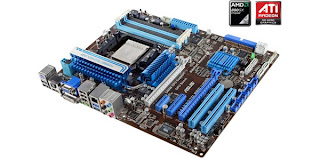
  • Let me start with the good points first. I can say that it is highly overclockable, one example of a motherboard that has this chipset is the ASUS M4A89GTS PRO (above). Judging on different reviews with this board, it has lots of options for overclocking on the board itself, and another thing, with good airflow and third party coolers then you can still push this by overclocking the BIOS hassle free. 
  • It supports the latest USB 3.0 which can run up to 6Gbps as suppose to USB 2.0 which runs only at 3Gbps. 
  • Another good thing about this, is having a crossfire with the new ATI HD5850 with it's integrated GPU the HD4290.
  • It will also support the upcoming 6 cores from AMD this year.
  • One thing though, is that it is cheaper than you think. I will give you the link from newegg.com later on the page.
So far, this three features are the ones I like with the 890GX chipset. For the downside:
  • First thing, since it is the latest chipset to date, you must have the advantage of the latest DirectX 11 which it failed to consider.
  • With regards to its integrated GPU, so far, based on other reviews i've read, only the HD5850 is supported in crossfire with it.
I think, that's about it. So if you plan to buy one,  I recommend this and go ahead, enjoy the power of the latest chipset technology from AMD. 

Here's the latest pricing from newegg:
http://www.newegg.com/Product/Product.aspx?Item=N82E16813131631&nm_mc=AFC-C8Junction&cm_mmc=AFC-C8Junction-_-Motherboards%20-%20AMD-_-ASUS-_-13131631&AID=10440897&PID=3335429&SID=

Saturday, December 26, 2009

Tired of the different Action Center popups in Windows 7?

If you are indeed tired of it, then this would be helpful for you... In the action center, there are different options that we do not need depending on your preference. So to disable some of which, here's how:

  • First, go to the start menu, when you are there, type in Action Center on the search field
  • Then, a dialog box will pop up
  • On the left hand side corner, select Change Action Center settings
  • You will see there, different options with checks, now, here's the catch
  • You now uncheck the options wherein you feel you do not need to be reminded of,
  • As for me, I did unchecked User Account Control from the Security messages
  • Windows Backup and Windows troubleshooting from the Maintenance messages. 
Enjoy!

Tuesday, December 22, 2009

Hidden user accounts in Windows 7... (tweak)

Here's a little tweak about enabling a hidden user accounts in Windows 7. There are links that I will be posting leading you to download the tweaks that I will be sharing with you this second. These links are concerned in turning it ON or OFF.
This tweak actually adds up this neat little Advanced User Accounts in your control panel (User Accounts) so you can manipulate whatever advanced settings or options you want, like changing the password or creating a password and others.
Without further ado, I will now post you the links for you to download (care of pcwizkid):

http://pcwizkidstechtalk.com/downloads/AddAdvAccounOption.zip (This link is to add the tweak or ON. This automatically installs it to your registry hassle free)

http://pcwizkidstechtalk.com/downloads/RemoveAdvAccountOption.zip (This link on the other hand removes the tweak or OFF.)

How to use:
  • After you have downloaded the file, just unzip it using your favorite utility (winrar, winzip, and etc.)
  • Once you've unzipped it, just double click on the file and press Yes then OK.
Enjoy!

Sunday, December 13, 2009

Want a desktop clock? (Windows ME, NT, 2000, XP, 2003 and Vista)

Here's "ClocX"!

This is a freeware so no need to worry about expenses plus it is light and has neat features in it like the mouse over transparency function.

It works on the different Operating systems listed above so you do not have to problem with compatibility. I haven't tried it in windows 7 so I do not have a clue yet whether itwould and it did worked. So I might as well share you this tool to you. Enjoy and hope you will like it!

http://www.clocx.net/download.php

Thursday, December 3, 2009

A graphics editor for you... (GIMP)

If you want a graphics editor that's free and works like adobe photoshop, well, here's one for you (GIMP). Now one of the features I like about this application is that, it is lightweight meaning it does not eat too much of your RAM (Random Access Memory) plus, it does not need much work from your CPU.

There is nothing more to say about this neat little utility because it has all the basic stuffs you need to have to do editing or create your own original work.

Try this and go check it out, hope you will like it...

Here's the link:
http://www.gimp.org/

Thursday, November 26, 2009

Tweak your Windows XP using TweakUI...

Here's a neat little utility that will enable you to tweak your Windows XP, the TweakUI. This application has lots of neat tweaks in it. Just install it and go through it SLOWLY.

Yes, i'll mention it again SLOWLY, because I don't want you to miss the tweaks that you can do with this utility. I've been using it personally and there's no problem with it ever since. It is from Microsoft and I want to share it with you guys.

Before i'll give the link, I just want to orient you with what's in it.  In there, you will see different subheading on the left side corner and each subheadings has their corresponding tweaks. Like the mouse. In there you can increase the sensitivity of your mouse and the Hover sensitivity and time. Another neat features available are that you can remove the arrows on your desktop icons or enable or disable autoplays.

These are just bits of it. So for the third time go through it SLOWLY. Enjoy!

So here's the link guys:
http://download.microsoft.com/download/f/c/a/fca6767b-9ed9-45a6-b352-839afb2a2679/TweakUiPowertoySetup.exe

Thursday, November 19, 2009

Tired of your old cursors?

Here's a link for you to get brand new cursors that would suit your style and personality.
Link:
http://www.customise.org/browse/cursor

To download it, just click on the cursors you want, then it will preview what you have selected.
If you want it, just click the Download file below the previewed cursors then select the Click here to download: (whatever choice you have).
It will now download the file in a Zip. Now here's what you're going to do:
  • If you have saved the file from your hard drive, just right click on it and extract it to c:\windows\Cursors then click OK.
  • Now go to the Control Panel and open the Mouse option to change the settings.
  • In there you can now select on the Pointers tab and change the pointer by clicking on Browse... at the bottom part of the dialog box.
  • Once you have selected (Browse...), just select the folder or the mouse pointer you want.
  • After you're done selecting the pointer, just click open and it will revert back to the dialog box where you have your options on what to customize.
  • If you want to change the Help Select, or Working In Background or whatever, you can do so by following the same procedure as to the 4th bullet.
  • Now if you're done changing everything, just select Apply then OK.
You're done! Enjoy your new mouse cursors!